
8 Best Digital Asset Management Software Solutions in 2026
Marketing team just spent three hours searching for last quarter’s product photos. Your designer accidentally used an outdated logo in a major campaign. Your brand manager can’t figure out which assets are approved for external use.
If this sounds familiar, you’re experiencing the chaos of poor digital asset management—and you’re not alone. Organizations lose an average of $5.7 million annually due to scattered, disorganized digital assets.
The solution? A purpose-built Digital Asset Management (DAM) system that transforms content chaos into strategic advantage. But with dozens of platforms claiming to be “the best,” how do you choose?
I’ve spent weeks testing interfaces, analyzing user reviews, speaking with actual DAM users across industries, and evaluating pricing models to bring you this comprehensive guide. Whether you’re a small creative team or a global enterprise, you’ll find a DAM solution that fits your specific needs, budget, and technical requirements.
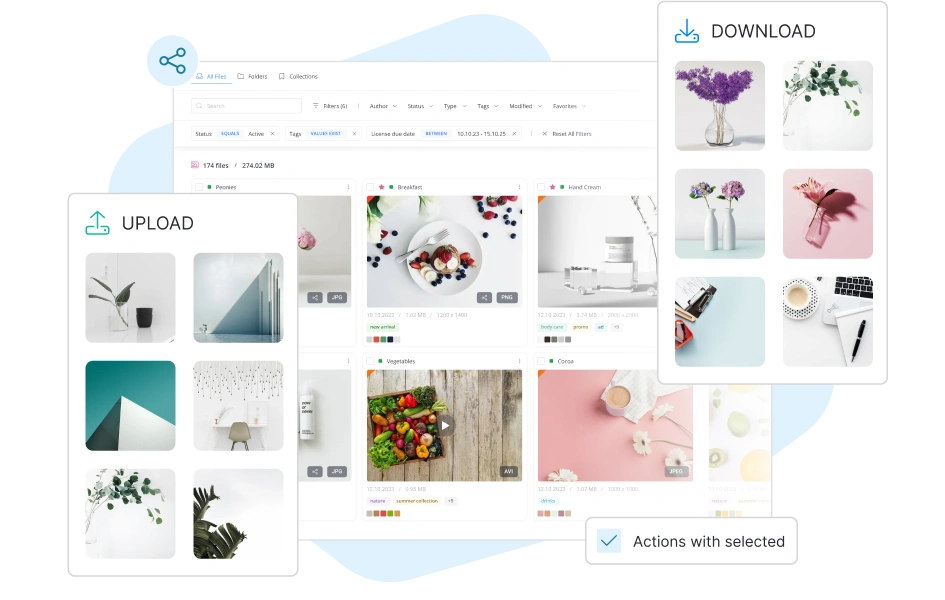
What Is Digital Asset Management Software?
Digital asset management software is your central command center for all things visual and creative. It’s where images, videos, logos, brand guidelines, product photos, marketing materials, and design files live, breathe, and stay organized.
Think of DAM as the difference between a junk drawer and a professionally organized filing system. One makes you want to scream; the other makes you efficient.
A modern DAM platform should:
- Centralize storage for all digital content in one secure, accessible location
- Organize intelligently using tags, metadata, folders, and AI-powered categorization
- Enable powerful search so anyone can find exactly what they need in seconds
- Control access with granular permissions ensuring the right people see the right assets
- Track versions to prevent costly mistakes from using outdated content
- Facilitate collaboration with comment threads, approvals, and sharing capabilities
- Integrate seamlessly with your existing tools like Adobe Creative Suite, CMS platforms, and marketing automation
- Provide analytics showing which assets perform best and drive ROI
What Makes a DAM System Worth Your Investment?
After analyzing hundreds of user reviews and testing multiple platforms, I’ve identified the critical factors that separate exceptional DAMs from mediocre ones:
1. Intuitive Interface
If your team needs a week-long training course just to upload a file, that’s a problem. The best DAMs feel natural from day one, with drag-and-drop functionality and clean, logical organization.
2. AI-Powered Intelligence
Manual tagging is dead. In 2025, your DAM should automatically recognize objects, faces, colors, and concepts, saving your team countless hours of metadata entry.
3. Scalability
Today you have 10,000 assets. Next year? Maybe 100,000. Your DAM should scale effortlessly without performance degradation or price shocks.
4. Enterprise-Grade Security
Digital assets are valuable intellectual property. Look for encryption, compliance certifications (GDPR, SOC 2), detailed audit trails, and robust access controls.
5. Integration Ecosystem
Your DAM shouldn’t exist in isolation. Native integrations with Adobe Creative Cloud, WordPress, Shopify, social media platforms, and marketing tools multiply its value exponentially.
6. True Collaboration Features
Modern work is collaborative. Your DAM should support annotations, approval workflows, comment threads, and external guest access for partners and agencies.
7. Transparent Pricing
Beware of platforms that hide pricing behind “contact sales” walls with hidden fees for storage, users, or AI features. The best vendors are upfront about costs.
8. Responsive Support
When something breaks (and it will), you need humans who answer quickly and solve problems—not chatbots that recite knowledge base articles.
8 Best DAM Solutions for 2026
1. Intrical — Best AI-Native DAM for Growing Businesses
What makes Intrical exceptional:
Intrical launched in 2025 with a bold premise: what if a DAM was designed from scratch with AI at its core, not bolted on as an afterthought? The result is refreshingly different.
Standout features:
- Native AI everywhere: Automatic tagging, facial recognition, similar image search, background removal, and color palette detection—all standard, not premium add-ons
- Industry agnostic: Unlike DAMs built specifically for e-commerce or media, Intrical serves marketing teams, tourism companies, real estate firms, educational institutions, and government agencies with equal elegance
- Complete file type support: Store literally anything—images, videos, documents, design files (PSD, AI), 3D models, audio, archives. The preview engine handles 500+ formats
- Transparent pricing: Starter at €199/month, Team at €459/month, Enterprise custom. No surprises, no nickel-and-diming
- Governance without complexity: Flexible metadata, license management, role-based access, file status workflows, and version control that don’t require a PhD to configure
Who should choose Intrical:
- Mid-size companies (50-500 employees) needing enterprise features without enterprise complexity
- Marketing and creative teams wanting AI capabilities without paying premium prices
- Organizations managing diverse content types across multiple departments
- Companies prioritizing fast implementation (productive within one week vs. 6+ months)
What users say: “We reduced content preparation time from 3 days to 4 hours—94% faster. Our small team now handles work that previously required external contractors.” — European Fashion Retailer
Pricing:
- Starter: €199/month (100GB, 1 user, all AI features)
- Team: €459/month (1TB, 15 users, guest portals, API access)
- Enterprise: Custom (unlimited storage/users, on-premise option, dedicated manager)
- Annual discount: 10% off
Best for: Organizations wanting AI-first DAM capabilities at honest prices, without sacrificing power or scalability.
2. Bynder — Best Enterprise DAM for Complex Organizations
What makes Bynder exceptional:
Bynder is the enterprise heavyweight, trusted by Puma, Spotify, TED, and Five Guys. If your organization has complex workflows, multiple brands, global teams, and intricate approval processes, Bynder was built for you.
Standout features:
- Modular architecture: Pick exactly the features you need; don’t pay for bloat
- Advanced workflow automation: Build sophisticated approval chains and content pipelines
- Robust brand management: Create brand portals, enforce guidelines, manage multiple brands from one platform
- Extensive integrations: Deep connections with Adobe, Microsoft, Google Workspace, and marketing automation platforms
Who should choose Bynder:
- Large enterprises (1,000+ employees) with complex organizational structures
- Companies managing multiple brands, regions, or business units
- Organizations requiring extensive customization and white-glove support
Considerations:
- Higher price point reflects enterprise positioning
- Implementation can be complex, requiring dedicated resources
- Interface has a learning curve for new users
Pricing: Contact for quote (typically $50K+ annual commitment)
Best for: Fortune 500 companies and large enterprises needing maximum flexibility and comprehensive features.
3. Canto — Best All-Around DAM for Diverse Teams
What makes Canto exceptional:
Canto strikes a rare balance: powerful enough for enterprises like Sony and Columbia University, yet approachable enough for mid-size teams. It’s been refined over years to serve diverse industries with varying needs.
Standout features:
- Intuitive interface: Consistently praised for usability
- Unified DAM + PIM: Manage both assets and product information from one platform
- AI Library Assistant: Automated categorization and metadata enrichment
- Brand Studio: Empower non-designers to create on-brand content
- Media Publisher: Directly publish assets across channels
Who should choose Canto:
- Mid-to-large organizations across retail, healthcare, education, nonprofits
- Teams needing both DAM and basic PIM capabilities
- Companies prioritizing ease of adoption and strong support
Considerations:
- Can feel pricey for smaller teams
- Some users report the interface feels slightly dated compared to newer platforms
- AI features improving but not as comprehensive as AI-native solutions
Pricing: Contact for quote
Best for: Established organizations wanting proven, reliable DAM with excellent support.
4. Air — Best Visual-First DAM for Creative Teams
What makes Air exceptional:
Air is gorgeous. If you’ve ever been frustrated by clunky, enterprise-feeling interfaces, Air will be a breath of fresh air (pun absolutely intended). It prioritizes visual browsing and creative workflows over corporate-style organization.
Standout features:
- Beautiful visual interface: Browse assets like a Pinterest board, not a file manager
- Paige AI assistant: Natural language search, facial recognition, dictation, custom object recognition
- Simple collaboration: Comment threads, approvals, and sharing that just work
- Fast setup: No IT department required; productive in hours
Who should choose Air:
- Creative agencies and design teams (5-50 people)
- Marketing departments prioritizing visual discovery
- Teams wanting beautiful UX and minimal configuration
Considerations:
- Less feature-rich than enterprise platforms
- May not scale well for very large organizations (1,000+ users)
- Newer platform still adding advanced features
Pricing: From $83.33/month for small teams; $250+/month for larger needs
Best for: Creative-first teams valuing design, simplicity, and modern UX over complex enterprise features.
5. Acquia DAM (formerly Widen) — Best DAM for Drupal Users
What makes Acquia exceptional:
If your website runs on Drupal, Acquia DAM offers unmatched integration. It’s purpose-built to work seamlessly with Drupal’s content management ecosystem.
Standout features:
- Deep Drupal integration: Native connection to Drupal CMS
- Extensive customization: Tailor everything to your exact workflow
- Advanced metadata: Create complex taxonomies and custom fields
- Powerful search: Faceted search with saved searches for repeat queries
Who should choose Acquia:
- Organizations heavily invested in Drupal CMS
- Enterprises needing deep customization capabilities
- Teams managing complex taxonomies and metadata requirements
Considerations:
- Steep learning curve, especially for non-technical users
- May be overkill if not using Drupal
- Some users report occasional technical issues
Pricing: Contact for quote
Best for: Drupal-centric organizations wanting seamless CMS/DAM integration.
6. Brandfolder — Best for Brand Consistency Management
What makes Brandfolder exceptional:
Brandfolder (now part of Smartsheet) excels at maintaining brand consistency across decentralized teams, external partners, and global markets.
Standout features:
- Customizable brand portals: Create beautiful, branded asset hubs for different audiences
- Template management: Ensure all branded materials follow guidelines
- Brand Intelligence: AI-powered insights into asset performance and usage
- Robust sharing: Granular permissions and curated collections
Who should choose Brandfolder:
- Organizations with distributed teams and external partners
- Companies prioritizing brand consistency and compliance
- Marketing teams managing multiple brands or sub-brands
Considerations:
- Limited integrations compared to some competitors
- Occasional performance issues during peak usage
- Pricing not always transparent
Pricing: Contact for quote
Best for: Brand-obsessed organizations managing complex distribution networks.
7. Pics.io — Best for Google Workspace Teams
What makes Pics.io exceptional:
Pics.io is built specifically for teams already living in Google Drive. If your organization runs on Google Workspace, Pics.io layers powerful DAM capabilities directly onto your existing file structure.
Standout features:
- Google Drive integration: Works directly with your existing Drive files
- Speech-to-text transcription: Makes video content searchable
- Facial recognition: Organize photos by person
- Project management integrations: Connects with Trello, Asana, Slack
- Affordable pricing: Significantly cheaper than enterprise DAMs
Who should choose Pics.io:
- Small-to-medium teams (10-100 people) on Google Workspace
- Organizations wanting to enhance Google Drive rather than replace it
- Teams needing strong project management integration
Considerations:
- Limited advanced features compared to standalone enterprise DAMs
- AI keywording less sophisticated than AI-native platforms
- May not scale well for very large organizations
Pricing: $600/month (50 users), $1,100/month (100 users)
Best for: Google Workspace teams wanting DAM superpowers without migration headaches.
8. Filecamp — Best Budget-Friendly DAM
What makes Filecamp exceptional:
Filecamp is unapologetically straightforward: secure file storage, basic organization, and collaboration at prices that won’t give your CFO nightmares.
Standout features:
- Unlimited users: All plans include unlimited user accounts
- Transparent pricing: Clearly published tiers without “contact sales”
- Strong security: Encryption and granular access controls
- Simple interface: Anyone can use it without training
Who should choose Filecamp:
- Small businesses (5-20 people) with basic DAM needs
- Teams prioritizing affordability and simplicity
- Organizations wanting secure sharing without complexity
Considerations:
- Limited advanced features (no AI, basic search)
- Not suitable for complex workflows or enterprise scale
- Occasional performance issues with large files
Pricing:
- Basic: $29/month (basic features)
- Professional: $89/month (full features, 100GB storage)
Best for: Small teams needing secure, organized file sharing without breaking the bank.
Comparison Table: Find Your Perfect DAM
| Platform | Best For | Starting Price | Key Strength | Ideal Team Size |
|---|---|---|---|---|
| Intrical | AI-first growing businesses | €199/month | Native AI, transparent pricing | 10-500 |
| Bynder | Complex enterprises | Contact | Enterprise flexibility | 1,000+ |
| Canto | Diverse teams | Contact | Balance of power and usability | 100-1,000 |
| Air | Creative teams | $83.33/month | Beautiful visual interface | 5-100 |
| Acquia DAM | Drupal users | Contact | Deep CMS integration | 100-1,000+ |
| Brandfolder | Brand consistency | Contact | Brand portals and templates | 50-1,000 |
| Pics.io | Google Workspace teams | $600/month | Google Drive integration | 10-100 |
| Filecamp | Budget-conscious teams | $29/month | Affordability | 5-50 |
How to Choose the Right DAM for Your Organization
Step 1: Define Your Must-Haves
Start by answering these questions:
- How many digital assets do we currently manage? (1,000? 100,000? More?)
- How many users need access? (Internal only? External partners too?)
- What types of files do we handle most? (Images? Video? Design files? All of the above?)
- What’s our biggest pain point? (Finding assets? Version control? Collaboration? Brand consistency?)
- What’s our realistic budget? (€200/month? €2,000/month? Enterprise-level?)
Step 2: Prioritize Your Requirements
Rank these factors by importance for your specific situation:
- Ease of use and intuitive interface
- AI-powered automation and smart features
- Collaboration and approval workflows
- Integration with existing tools (Adobe, CMS, marketing platforms)
- Scalability for future growth
- Security and compliance requirements
- Customer support quality
- Total cost of ownership
Step 3: Test Before You Commit
Most DAM platforms offer free trials or demos. Use them. Actually test with:
- Your real files (upload a representative sample)
- Your actual team (involve the people who’ll use it daily)
- Your specific workflows (try your most common tasks)
- Your integrations (confirm they work as advertised)
Step 4: Calculate Total Cost of Ownership
Don’t just look at monthly fees. Consider:
- Implementation time and costs
- Training requirements
- Storage costs (including future growth)
- Integration and customization expenses
- Ongoing support and maintenance
A “cheaper” solution that requires six months of implementation and extensive training may cost more than a slightly pricier option you can deploy in a week.
The Emerging Trends Shaping DAM in 2026
AI Is No Longer Optional
In 2025, AI-powered features aren’t premium add-ons—they’re baseline expectations. Automatic tagging, intelligent search, facial recognition, and background removal have moved from “nice to have” to “must have.”
Look for DAMs where AI is native to the architecture, not bolted on as an afterthought. The difference in performance and reliability is substantial.
DAM + PIM Convergence
The line between Digital Asset Management and Product Information Management is blurring. Modern platforms increasingly handle both visual assets and structured product data, creating a single source of truth for e-commerce and product teams.
API-First Architecture
The best DAMs in 2025 are built API-first, meaning they’re designed to integrate with anything. Your DAM should be a hub, not a silo, connecting seamlessly with your entire technology ecosystem.
Video-First Optimization
With video content dominating marketing strategies, DAMs are evolving beyond static image management. Look for platforms with robust video handling: transcription, frame-level tagging, automatic thumbnail generation, and optimized streaming.
Making Your Final Decision
Choosing a DAM isn’t just a technology decision—it’s a strategic business decision. The right platform multiplies your team’s productivity, protects your brand consistency, and turns scattered content into strategic advantage.
The wrong platform? That’s expensive shelfware that nobody uses.
Based on extensive research, user feedback, and hands-on testing, here’s my honest take on which DAM fits which scenario:
Choose Intrical if: You want cutting-edge AI capabilities at honest prices, with fast implementation and transparent costs. Perfect for growing businesses (50-500 employees) that need enterprise features without enterprise complexity.
Choose Bynder if: You’re a large enterprise with complex needs, multiple brands, and the budget for maximum flexibility and customization.
Choose Canto if: You want proven reliability, excellent support, and a platform that balances power with usability. Safe choice for diverse organizations.
Choose Air if: You’re a creative team that values beautiful design and intuitive interfaces over enterprise-grade features.
Choose Acquia DAM if: Your website runs on Drupal and you need seamless CMS integration.
Choose Brandfolder if: Brand consistency and external distribution are your top priorities.
Choose Pics.io if: You live in Google Workspace and want to enhance Drive rather than replace it.
Choose Filecamp if: You’re a small team with basic needs and a limited budget.
Still unsure? Start with the platforms offering free trials or easy demos. Upload some real assets. Invite your team. See what feels right. The best DAM is the one your team will actually use—not the one with the longest feature list.
Your future self—the one not frantically searching for that logo file at 5pm on Friday—will thank you for choosing wisely.