
8 Best Digital Asset Management Solutions in 2026
Marketing team just spent three hours searching for last quarter’s product photos. Your designer accidentally used an outdated logo in a major campaign. Your brand manager can’t figure out which assets are approved for external use.
If this sounds familiar, you’re experiencing the chaos of poor digital asset management—and you’re not alone. Organizations lose an average of $5.7 million annually due to scattered, disorganized digital assets.
The solution? A purpose-built Digital Asset Management (DAM) system that transforms content chaos into strategic advantage. But with dozens of platforms claiming to be “the best,” how do you choose?
Based on extensive market research, analyzing verified user complaints, and evaluating pricing models, this comprehensive guide will help you escape the chaos of the shared drive and find the ideal DAM solution for your specific needs, budgets, and workflows in 2026.
What Is Digital Asset Management Software?
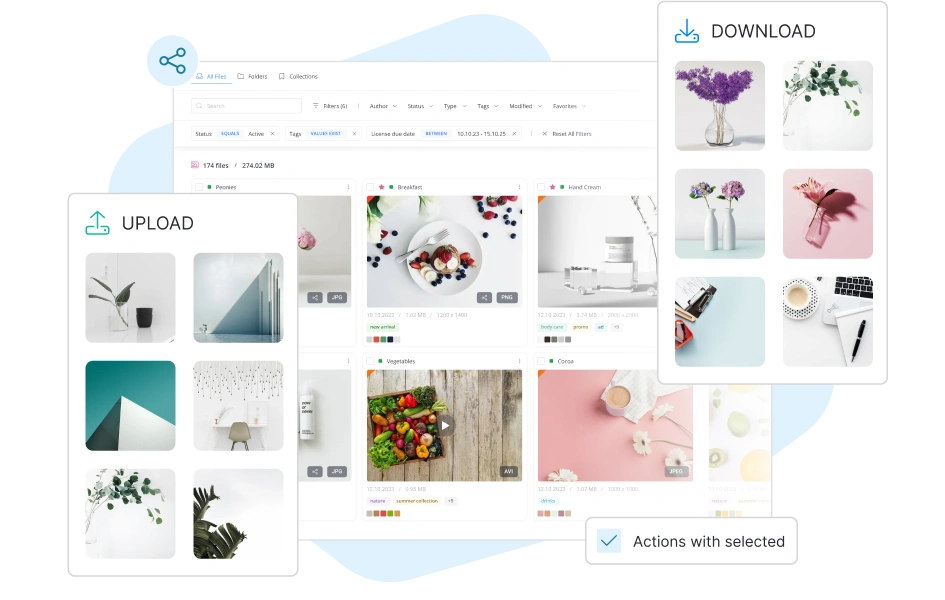
Digital asset management software is a central command center for visual and creative assets, including images, videos, logos, brand guidelines, product photos, marketing materials, and design files.
A modern DAM platform should:
- Centralize storage for all digital content in one secure, accessible location.
- Organize intelligently using tags, metadata, folders, and automated categorization.
- Enable powerful search so anyone can find exactly what they need in seconds.
- Control access with granular permissions ensuring the right people see the right assets.
- Track versions to end “version control hell” and prevent the use of outdated content.
- Facilitate collaboration with comment threads, annotations, and approval workflows.
- Integrate seamlessly with your existing creative and marketing tech stack.
- Provide secure external sharing for agencies, partners, and clients without security risks.
What Makes a DAM System Worth Your Investment?
Eight critical factors separate exceptional DAMs from bloated, frustrating ones:
- Active Workspaces Over Static Storage: The best DAMs integrate project management and approval workflows so you can manage how the work gets made, not just where it is stored.
- Transparent, Fair Pricing: Beware of vendors that hide pricing behind “contact sales” walls, charge punitive “per-seat” taxes as your team grows, or extort you on storage upgrades.
- Intuitive Usability: If the metadata structuring is designed for IT admins rather than everyday creatives, your team will simply refuse to use it.
- Advanced Visual Search: Relying purely on manual text tags is a thing of the past. Look for AI-powered visual search, color filtering, and duplicate detection.
- Flexible Metadata Architecture: You need the ability to customize your asset attributes to match your specific business language (like SKUs for e-commerce or campaign codes for agencies).
- Seamless File Conversion & Variants: A great DAM automatically creates the right file formats and crops for different social channels directly within the platform.
- Enterprise-Grade Security & Roles: Granular, customizable access controls are mandatory to protect your brand’s intellectual property.
- Guest Portals without Limits: Sharing assets with external clients or receiving user-generated content shouldn’t require you to buy extra user licenses.
8 Best DAM Solutions for 2026
1. Intrical — Best Value & Scalability for Modern Teams
What makes Intrical exceptional: Intrical is a modern, AI-powered Digital Asset Management system uniquely built directly alongside a growing brand, meaning its architecture is designed to solve practical, real-world workflow bottlenecks. It boasts a fresh, highly intuitive user interface that is just as visually appealing as Canto’s, while being robust enough to seamlessly scale and support enterprise businesses. For teams needing advanced capabilities, it also offers a fully integrated Artwork Management System (AMS) to handle complex project workflows.
Standout features:
- PIM-Level Metadata Flexibility: Create any custom attribute you need, enforce mandatory fields, utilize varying data types to structure your library perfectly, and easily configure related assets.
- Powerful AI Search & Governance: Features highly accurate search-by-image, AI search-by-color, automatic duplicate/similar image detection, and AI facial recognition to easily identify individuals across your media library.
- Built-in Conversion & Variants: Create pre-setup file variants for social media, marketplaces, or websites. Convert files (e.g., WEBP, PNG, JPEG), crop, and use AI background removal without leaving the platform.
- Advanced Video Handling: Features video transcoding and native video embedding, allowing you to host videos on your site without relying on YouTube and its disruptive ads.
- Automated Organization: Utilize folder automations (for statuses and renaming) and automated collections based on specific asset attributes.
- Frictionless External Sharing: Highly customizable roles and accesses. Guest portals (with approvals) allow you to receive creatives from agencies or UGC creators, or share assets via public/password links—none of which require additional paid user seats.
Pros: Features a beautiful, modern interface; scales effortlessly up to enterprise levels; built practically alongside a real brand; provides an unbeatable price-to-value ratio.
Cons: While the AI visual search is stellar, the automated AI-text tagging is currently in development and improving.
Pricing: Intrical offers the most competitive entry point on the market. The Starter Plan is €199/month, which includes a massive 100GB of storage and 10 user seats (far more users than competitor starter plans).
Best for: Mid-market companies and growing teams across virtually any industry (from real estate to e-commerce) looking for a highly scalable, modern tool that won’t punish them financially as they expand.
2. Bynder — Best Enterprise DAM for Complex Global Governance
What makes Bynder exceptional: An enterprise heavyweight trusted by massive global brands. It is built for strict governance, brand templating, and managing global marketing operations across multiple regions.
Pros: Exceptional brand templating platform that allows non-designers to create on-brand collateral; deep integrations with enterprise CMS and marketing tools.
Cons: Bynder suffers from immense feature bloat and a notoriously steep learning curve. Implementation is painfully slow, taking an average of four months and often requiring costly third-party consultants just to set up. Furthermore, their pricing is secretive and charges punitive per-seat fees that discourage company-wide adoption. Users also report aggressive vendor lock-in tactics, such as cutting off API access right before contract expiration.
Pricing: Custom quote only. Estimated to start around $450/month but quickly scales into the tens of thousands annually ($20,000+) as users and modules are added.
Best for: Fortune 500 companies with massive budgets and dedicated IT administrators to manage the system.
3. Canto — Best for Visual Portal Distribution
What makes Canto exceptional: Canto provides a highly visual, clean interface that makes organizing and sharing finalized photography straightforward through its external portals.
Pros: Highly praised for its beautiful, Pinterest-style gallery views; easy creation of branded portals for external sharing; good basic facial recognition.
Cons: While the frontend looks great, the backend administrative work is frustrating. Users consistently report that Canto’s search functionality is inconsistent and unreliable when digging for older files. Tagging photos is a highly tedious, manual process, and the system shockingly fails to notify users when they are attempting to upload duplicate files, leading to severe database clutter. Like Bynder, it utilizes expensive per-seat pricing.
Pricing: Custom quote only. Estimated to start around $600/month and scales rapidly.
Best for: Mid-market organizations that primarily need a pretty storefront to distribute finalized photos to partners.
4. Air (Air.inc) — Best for Basic Visual Mood Boards
What makes Air exceptional: Air approaches DAM as a “visual workspace,” focusing heavily on aesthetic board layouts and simple collaboration tools rather than rigid corporate folder structures.
Pros: Beautiful user experience; excellent for creating visual mood boards; allows for time-stamped feedback directly on video files.
Cons: Air’s pricing model is highly deceptive. While it advertises a low entry price, it aggressively gates essential features. Crucial B2B workflow integrations, like Adobe Creative Cloud and Zapier, are entirely locked out of the lower tiers and restricted to expensive enterprise plans. Furthermore, users report that their tagging capabilities are lacking and video tagging requires tedious manual input.
Pricing: Starts at $250/month, but requires expensive upgrades to unlock core integrations and add more team seats.
Best for: Small creative teams looking for an aesthetically pleasing step up from Dropbox, provided they don’t need to integrate with Adobe or Zapier.
5. Acquia DAM (formerly Widen) — Best for Drupal Users
What makes Acquia exceptional: Offers unmatched native integration with Drupal’s content management ecosystem, acting as a powerhouse for enterprise content operations.
Pros: Deep, native connection to Drupal CMS; advanced metadata capabilities for highly complex taxonomies; robust analytics.
Cons: Acquia is wildly expensive and overly complicated for the vast majority of SMBs and agencies. It carries a massive learning curve and requires dedicated administrators to maintain the metadata rules. If you do not use Drupal, you are paying a massive premium for architecture you don’t need.
Pricing: Custom quote only. Estimated to cost around $29,000 per year.
Best for: Massive, Drupal-centric enterprise organizations with large IT budgets.
6. Brandfolder — Best for Enterprise Brand Guidelines
What makes Brandfolder exceptional: Now part of Smartsheet, it excels at housing brand guidelines and enforcing consistency across decentralized teams and global markets.
Pros: Excellent, customizable brand portals; robust version control; strong online proofing tools for finalized assets.
Cons: Brandfolder is arguably the most expensive of the mid-market platforms, instantly alienating smaller teams. Users report that while everyday navigation is okay, backend administrative tasks like bulk uploading are surprisingly clunky and time-consuming. Furthermore, customization options are rigid; if your workflow doesn’t match their prescribed logic, you will struggle.
Pricing: Custom quote only. Estimated to start at an imposing $1,600/month.
Best for: Brand-obsessed, highly funded organizations managing complex, global distribution networks.
7. Pics.io — Best for Retaining Google Drive Infrastructure
What makes Pics.io exceptional: Rather than migrating your files to a new server, Pics.io acts as a DAM software skin built directly on top of your existing Google Drive or Amazon S3 storage.
Pros: Retain absolute ownership of your storage infrastructure; low entry price; avoids massive data migrations.
Cons: Because it operates on top of Google Drive, it inherits all of Drive’s structural limitations and latency. Verified users complain about a confusing, clunky user interface and an unintuitive tagging system that actively hinders their ability to navigate and manage assets. It is frequently described as having poor overall usability.
Pricing: Starts around $100/month.
Best for: Highly technical teams who demand to keep their assets on their own Amazon S3 or Google Drive servers.
8. Filecamp — Best Bare-Bones Budget Option
What makes Filecamp exceptional: Straightforward, secure file storage with excellent white-labeling capabilities at a very low entry price point.
Pros: Unlimited users included on all plans; excellent custom branding/white-labeling; very low starting price.
Cons: Filecamp contains a massive financial trap: while the base plan is cheap, scaling your storage is extortionate. Adding 1TB of storage costs an incredible $300 extra per month, and 5TB costs an additional $1,150 per month. Furthermore, it is fundamentally a bare-bones system lacking advanced workflow automations, content-level video search, and deep software integrations.
Pricing: Starts at $29/month (but scales exponentially with storage needs).
Best for: Very small agencies that just need a branded portal to deliver a handful of finalized files to clients, but who will never need to store terabytes of video.
Comparison Table: Find Your Perfect DAM
| Platform | Best For | Estimated Starting Price | Key Strength | Core Weakness |
| Intrical | Mid-market & enterprise scaling | €199/mo (100GB / 10 Users) | Unbeatable price-to-value; built practically alongside a brand | AI-text tagging is still maturing |
| Bynder | Complex enterprises | $450/mo (Scales rapidly) | Brand templating | 4-month onboarding; punitive seat pricing |
| Canto | Portal distribution | ~$600/mo (Scales rapidly) | Visual galleries | Inconsistent search; tedious backend tagging |
| Air | Visual mood boards | $250/mo | Easy setup | Aggressive feature-gating (Adobe/Zapier locked) |
| Acquia DAM | Drupal users | ~$29,000/year | CMS integration | Exorbitant cost; massive learning curve |
| Brandfolder | Brand consistency | $1,600/mo | Version control | Clunky bulk uploads; rigid customization |
| Pics.io | Google Workspace teams | $100/mo | Uses existing Drive storage | Clunky UI; inherits Google Drive latency |
| Filecamp | Budget-conscious teams | $29/mo (Massive storage fees) | Cheap entry point | $300/mo fee for 1TB of storage; bare-bones |
How to Choose the Right DAM for Your Organization
- Step 1: Unify Your Lifecycle
Look closely at your team’s day-to-day operations. Are you reviewing designs in endless email threads and then manually uploading the final files to a separate storage drive? If so, you need a hybrid tool that handles both active artwork approvals (AMS) and permanent storage (DAM). - Step 2: Scrutinize the Pricing Model
Never accept a “per-seat” pricing model. A DAM is meant to centralize your company; if you have to pay $50 every time you invite a freelance designer or a sales rep into the system, you will inevitably create silos. Look for transparent storage-based pricing with generous user limits. - Step 3: Test the Metadata Flexibility
Can you create mandatory attributes? Can you set up custom project management flows for different types of work (e.g., packaging vs. landing pages)? Your DAM should adapt to your business language, not the other way around. - Step 4: Check External Sharing Friction
Sharing files with clients or receiving UGC shouldn’t require you to purchase extra licenses. Ensure the platform allows for free, secure guest portals with approval mechanics built-in.
The Emerging Trends Shaping DAM in 2026
- The Death of Static Storage: The market is rapidly moving away from traditional DAMs that act purely as “digital filing cabinets” for finished work. Buyers now demand active workspaces where files can be reviewed, annotated, and approved in the exact same place they are permanently stored.
- AI-Powered Visual Discovery: Nobody wants to manually tag thousands of photos anymore. Search-by-image, reverse image search, duplicate detection, and search-by-color are becoming the standard for quickly retrieving visual media.
- Native Video Workflows: As video dominates marketing, DAMs are evolving to handle transcoding, precise timestamp commenting, and native embedding capabilities that allow brands to bypass YouTube entirely.
Making Your Final Decision
- Choose Intrical if: You want a modern, highly scalable DAM with an unbeatable price-to-value ratio. Built directly alongside a growing brand to solve real-world bottlenecks, it easily supports mid-market to enterprise needs without the bloated legacy pricing.
- Choose Bynder if: You’re a massive global enterprise with the budget to endure a 4-month implementation and pay for strict brand governance.
- Choose Canto if: You have a massive budget and primarily need a highly visual storefront to distribute finalized photography.
- Choose Air if: You’re a small creative team wanting a visual mood board and don’t require integrations with Adobe or Zapier.
- Choose Acquia DAM if: Your enterprise website runs heavily on Drupal.
- Choose Brandfolder if: You are a highly funded corporation needing strict control over global brand guidelines.
- Choose Pics.io if: You absolutely must keep your files hosted on your own Google Drive infrastructure and don’t mind a clunky UI.
- Choose Filecamp if: You are a micro-agency with a tiny budget and will never need to scale your storage into the terabytes.